
Open Artifacts in the lobby. Each fighter wears 1 Core and 3 Supports, with three presets. Burn and Echo effects need the matching Potential on that fighter. Nightmare Zodiac Trials awards 3 Artifacts and 3 Tempering Dust per clear, with a separate boss bonus chance.
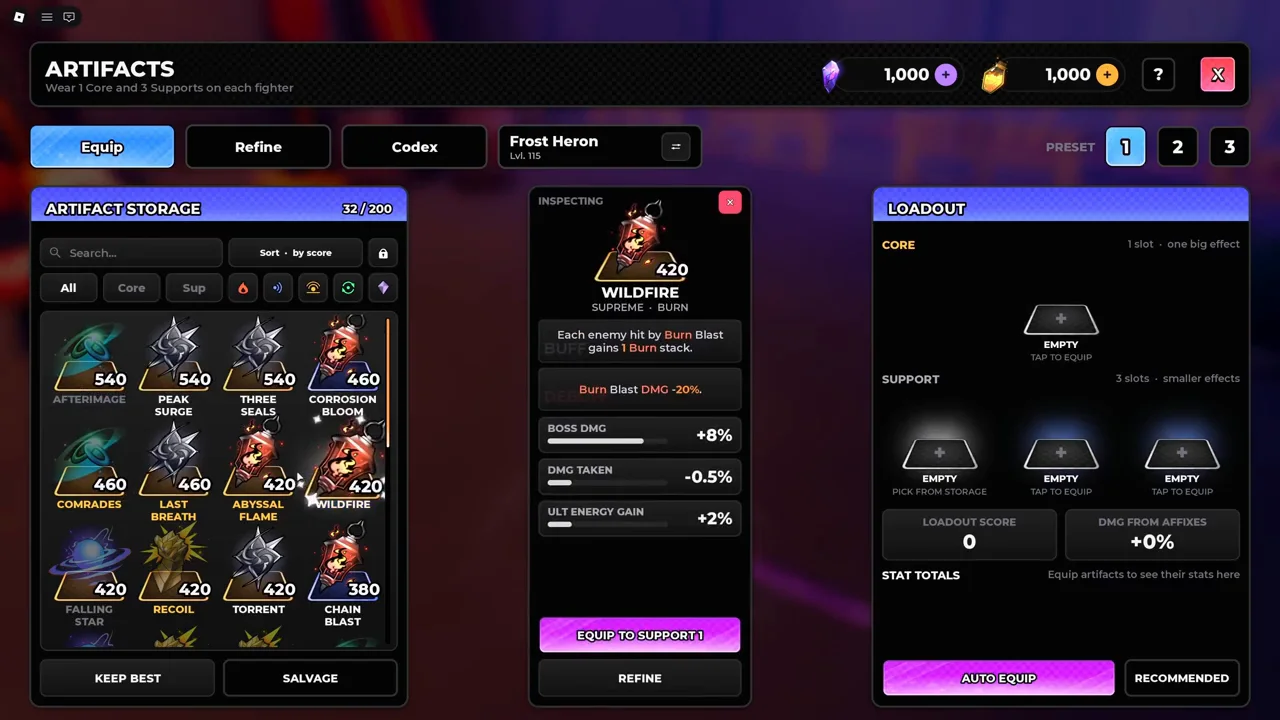
How to equip Artifacts
- 01
Open Artifacts from the lobby and select the fighter at the top. Switching the fighter changes the loadout you are editing.
- 02
Choose preset 1, 2 or 3. Select one Core and fill the three Support slots from storage.
- 03
Read the effect and its drawback before equipping. Look for red NO EFFECT text: an Echo card does not activate its Echo effect on a fighter without that path.
- 04
Check Stat Totals and DMG from Affixes after the change. These summarize equipped affixes; the Loadout Score is not a DPS result.
- 05
Keep the setup in the Build Planner, alongside that fighter’s Trait and Potential. Equip the same choices in Roblox when you return to the game.
| Equipment system | Slots | Where it belongs |
|---|---|---|
| Artifacts | 1 Core + 3 Supports | A separate loadout on each fighter; three presets. |
| Accessories | Head, Face, Neck and Back | The crafted accessory setup. These do not replace Artifact slots. |
| Potential | Echo, Burn, Counter or Swap path nodes | Select the same fighter. Path-specific Artifacts depend on these effects. |
Where to farm Artifacts: Nightmare Zodiac Trials
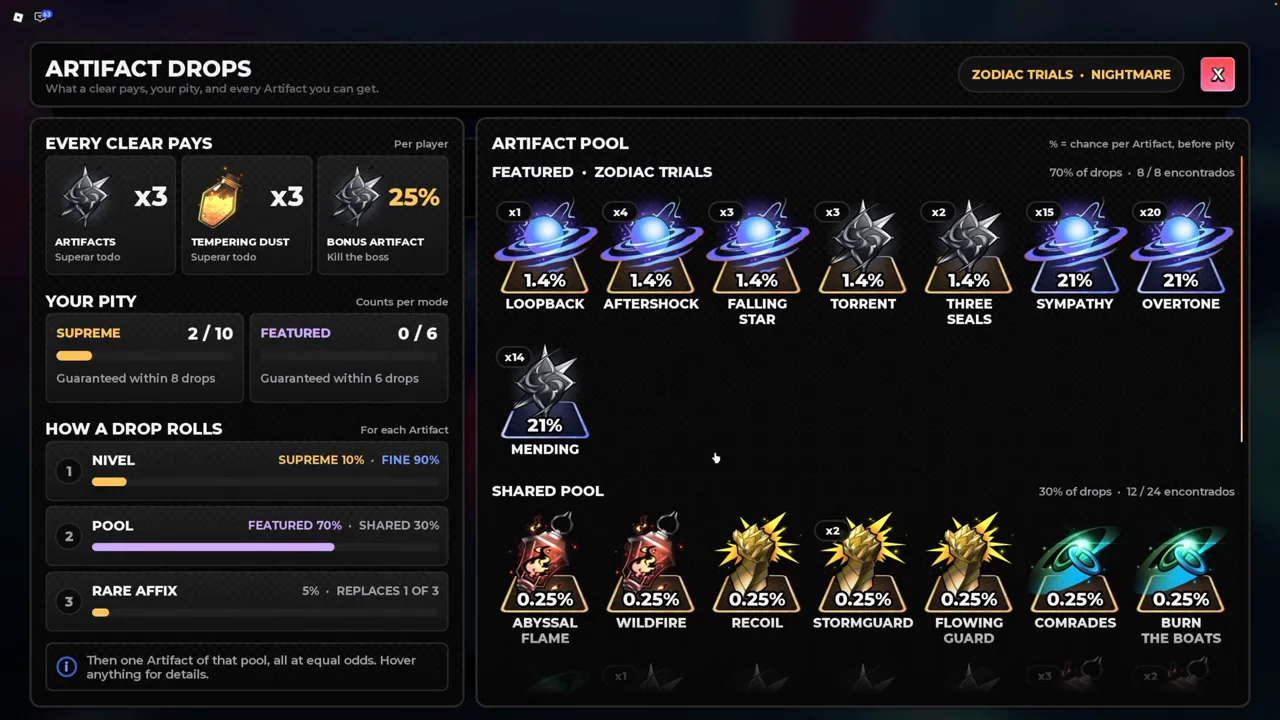
Open the Artifact VIEW POOL button in the selected raid’s reward preview. It separates the clear payout, boss bonus, rarity roll and pool pity. The table below is for Zodiac Trials on Nightmare, as shown in the November 2 reward panel.
- The featured names shown in this pool are Loopback, Aftershock, Falling Star, Torrent, Three Seals, Sympathy, Overtone, Mending.
- For another mode or difficulty, reopen that mode’s pool. Do not apply the Nightmare Zodiac percentages to Story or other Trials.
- Claim ARTIFACTS for Relic Shards and Tempering Dust before refining.
| Nightmare Zodiac rule | Amount or chance | What it means |
|---|---|---|
| Clear payout, per player | 3 Artifacts + 3 Tempering Dust | Finish the run to receive the clear rewards. |
| Bonus Artifact | 25% | A separate boss reward chance. |
| Rarity before pity | 10% Supreme / 90% Fine | Applied to each Artifact drop, rather than each full run. |
| Pool roll | 70% featured / 30% shared | The raid’s featured group and the shared group are separate pools. |
| Supreme pity | 10 drops | The counter is per mode. A 2/10 counter means at most eight further drops, not eight runs. |
| Featured pity | 6 drops | Read separately from Supreme pity; featured does not by itself mean Supreme. |
| Rare affix on a new drop | 5% | Replaces one of the card’s three ordinary affixes. |
Choose by Potential, effect and drawback
A card has an effect, a drawback and three rolled affixes. Match the effect first. If you use Echo, a Burn detonation effect has no rotation to trigger; Universal effects do not require one of those named paths.
Affix numbers vary between copies and change through refining. The examples below describe the named effects, without treating one creator’s rolled stats as the stats on your copy.
- Choose Loopback when you regularly land different skills during a pending Echo. Its longer Echo delay changes the timing of the next hit.
- Abyssal Flame increases Burn damage at an HP cost. Keep space for boss attacks instead of treating its nonlethal self-cost as protection from enemies.
- Last Breath is a survival option for a run that ends on one mistake. Its once-per-run effect and HP drawback matter more than the storage score.
| Artifact | Slot / path | Effect | Trade-off |
|---|---|---|---|
| Loopback | Core · Echo | Each pending Echo from a different skill adds 6% to the next Echo, up to four stacks. | Echo delay increases by 0.3 seconds. |
| Abyssal Flame | Core · Burn | Adds 30% Burn damage. | Each Burn detonation costs 1.5% Max HP. This self-cost cannot kill you and is not hostile damage. |
| Wildfire | Support · Burn | Enemies hit by Burn Blast gain one Burn stack. | Burn Blast damage decreases by 20%. |
| Corrosion Bloom | Support · Burn | A Burn Support artifact. Choose it by its current affixes and how it fits your Burn setup. | Read the individual card before replacing a Support; its three affixes can be rerolled. |
| Last Breath | Support · Universal | Once per run, a lethal hit leaves you at 1 HP and then heals 30% Max HP. | Max HP decreases by 5%. |
Reroll Affix, Reroll Value and Resonance
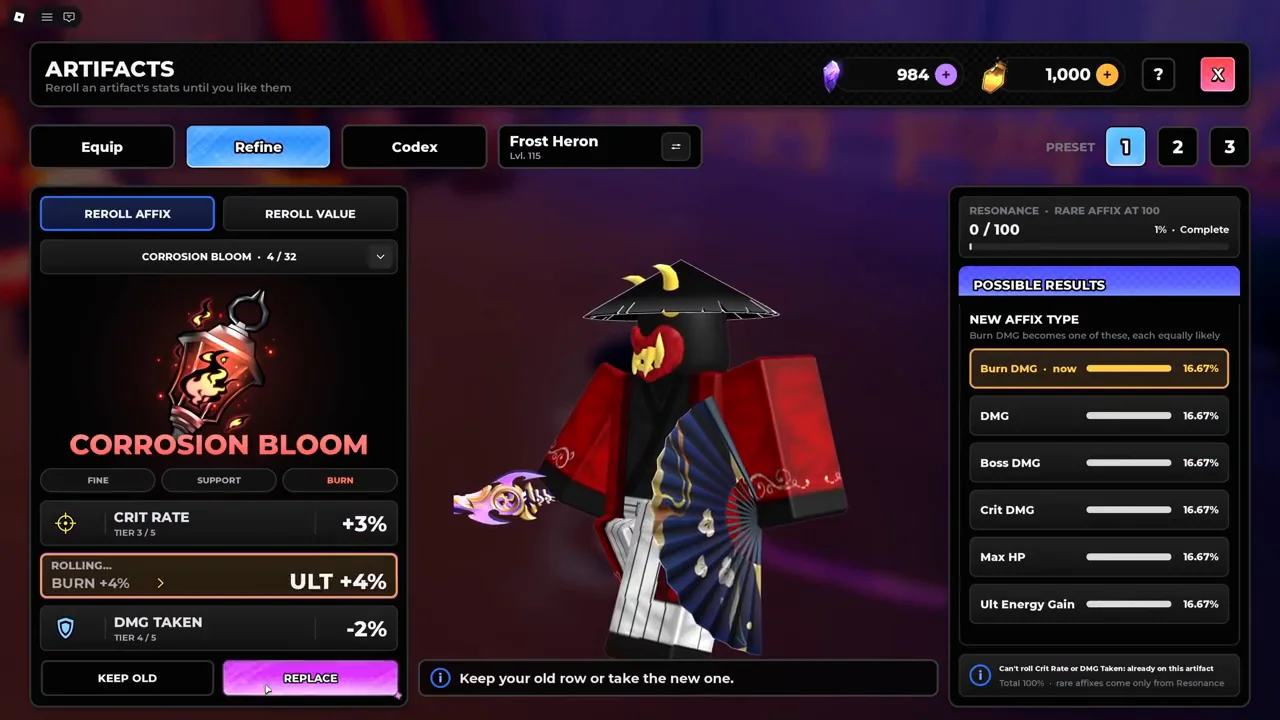
The demonstrated Fine Support roll costs 20 Relic Shards. The same screen offers Reroll Value as a separate action: check that button’s own price before committing. A new drop’s rare-affix chance and Refine’s Resonance meter are different mechanics.
- 01
Open Refine and choose the Artifact. Select the row you intend to change.
- 02
Use Reroll Affix to change the stat type. Use Reroll Value when you want to change the amount on the existing stat.
- 03
Read the possible-results panel. Already-present stats are excluded from that roll; the available pool changes with the selected row and card.
- 04
After the roll, choose Keep Old or Replace. Keep Old preserves the existing row; the roll has already spent its currency.
- 05
Watch the Resonance meter. The menu names a rare affix at 100; normal affix rerolls do not directly roll rare affixes from the ordinary pool.
Keep useful rolls before salvaging
- Storage holds 200 Artifacts. Filter Core or Support, then sort by score to inspect your collection.
- Keep copies that suit another fighter or path before using Keep Best or Salvage. Score alone does not account for the way you play that unit.
- Use Training to compare a change: reset the meter, keep target settings and the attack sequence the same, then repeat with the other loadout.
- Record the actual result in the Run Notebook. A dummy result is useful for that rotation; raid movement and missed casts can change the outcome.
Menus and video chapters
Frequently asked questions
How many Artifacts can I equip in Anime Zero?+
Each fighter has one Core and three Support slots. Select that fighter at the top of the Artifacts menu; its loadout is separate from your other fighter’s.
Why does my Artifact say NO EFFECT?+
Check whether its effect matches the selected fighter’s Potential. An Echo effect needs Echo; a Burn effect needs the corresponding Burn mechanics. Its ordinary stat affixes are a separate part of the card.
Does Supreme pity count Zodiac Trials runs?+
The Artifact pool counts drops, with separate counters per mode. The Nightmare panel shows Supreme at ten drops and featured at six; these are not ten and six raid clears.
Is a higher Artifact score always better?+
Compare its effect, drawback and rolled affixes against your rotation. A higher-score card with an inactive path effect can be less useful than a matching card.