
Use the Potential button, select your weapon and choose Loadout 1 or 2. Pick Echo, Burn, Counter or Swap for the rotation you play. Follow the Potential guide for current node costs, prerequisites and inputs.
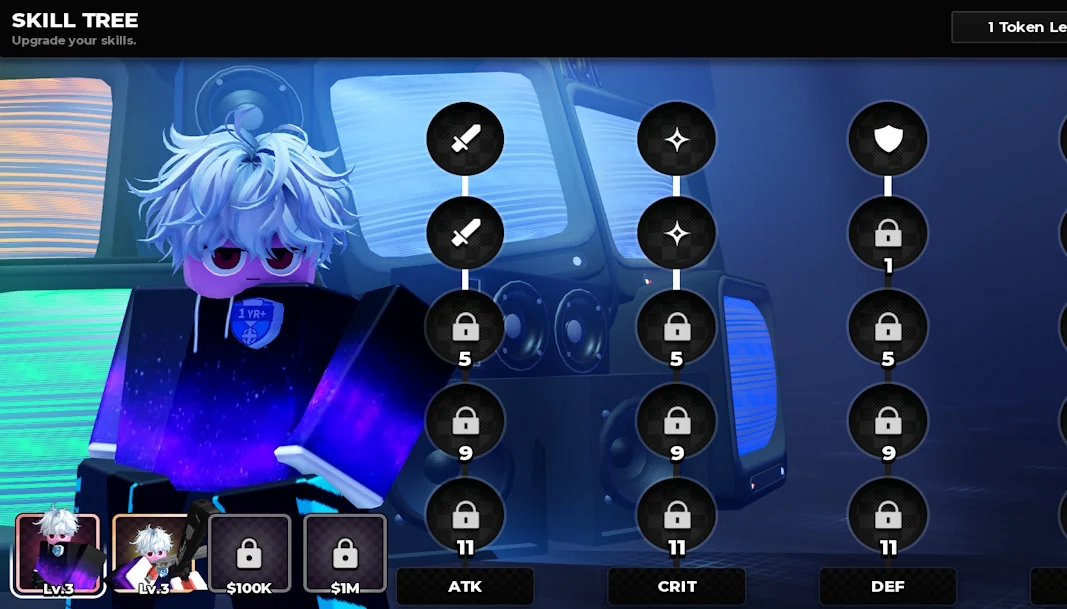
Current system: Potential replaces the Skill Tree
The Update 5.1 game log explicitly says Potential replaces the Skill Tree. It also raises the unit level cap to 200. The older Attack, Critical, Defense and Speed screen is not a second menu you need to find.
Open the Potential guide for the four paths, separate weapon selection, two loadouts and prerequisite controls. If an older guide tells you to spend Skill Tokens on Attack first, use the current Potential menu instead.
Earlier Skill Tree: Attack, Critical, Defense and Speed
These values describe the earlier tree. They are not Potential node values or four extra bonuses to add to a current build. Use them to identify old screenshots, then follow the current node panel in game.
| Former branch | Earlier listed progression | Stat it affected |
|---|---|---|
| Attack | 15% → 25% → 40% → 60% | Direct damage |
| Critical | 3% → 6% → 10% → 15% | Critical-hit chance |
| Defense | 5% → 10% → 15% → 25% | Reduced incoming damage |
| Speed | 5% → 10% → 15% → 25% | Movement speed |
Which current path should you choose?
Use Echo when you alternate damaging skills, Burn for repeated hits and detonations, Counter when you can time parries, or Swap when you regularly change weapons and land the next skill.
Read the trigger before choosing. A strong-looking node will do little if your rotation never activates it. The Potential path table puts those inputs beside each route.
Following an older video in the current version
Keep the same weapon and difficulty for that run. Changing the whole loadout at once makes it harder to tell whether the new node helped.
- 01
Check whether the video shows the old Skill Tree or the four-path Potential wheel.
- 02
Open Potential and select the weapon you use for most of the run.
- 03
Choose a loadout and read its unused-point counter.
- 04
Use Set Goal and Take Me There for the next prerequisite on your route.
- 05
Keep Traits, gear and the stage fixed when trying the new allocation.
Check the selected weapon and loadout
Potential has a weapon selector and two loadouts. Verify both before spending or refunding points. The displayed level and point counter belong to the selected weapon.
Choose a pair in the build planner, then set up each weapon’s Potential in game. Keep your developed main while you work on the replacement’s level, awakening and chosen nodes.
Frequently asked questions
Why can’t I find the Skill Tree?+
Update 5.1 replaced it with Potential. Use the Potential button in the lobby.
Should I follow an old Attack-first build?+
Use current Potential nodes instead. Choose a path whose trigger fits your skill rotation, parries or weapon switches.
Does one Potential setup apply to every weapon?+
Select the weapon at the top of Potential and check its chosen loadout. Do this again when changing the weapon you plan to use.
Why did a Critical upgrade make little difference?+
Look at your total critical chance and the current cap. Also try more attacks: a short run of lucky or unlucky crits can hide the change.